Build eAM/CMMS asset hierarchies around the people using them
Key Highlights
- Design new asset hierarchies that are simple, consistent and easy for users to navigate.
- Limit data input choices to 8-12 options per category to streamline data entry and improve accuracy.
- Build system configurations around user needs to enhance efficiency, ensuring quick identification of assets and manageable data entry processes.
- Avoid shortcuts that omit non-production assets or create overly detailed hierarchies, as these can cause delays and data inconsistencies.

Software deployment needs a strong plan for success. The plan should focus on the operational benefits, standardized, useful data and strong change management culture, but if the final system is difficult for people to use, the rest is moot. This three-part series covers six common mistakes that can delay the benefits of eAM/CMMS deployment. The first article addressed how to define the operational benefits and make useful information available. The second article looked at corporate standardization and culture change. This final article will focus on two mistakes that are closer to the shop floor: creating an asset hierarchy and the data entry process.
The objective should not be to create perfect data. It is to create information that is accurate and consistent enough to support decisions without making the system a burden to use.
Mistake: Insufficient or too complicated asset hierarchy
All work orders and work requests should be associated with an asset, so a successful asset hierarchy is one in which all users can quickly find the most appropriate asset when creating new work orders or requests. In order to deploy faster, sometimes companies take shortcuts in hierarchy design. When there is a legacy CMMS, the shortcut is to port over the old asset hierarchy with no effort to make the structure simpler and more consistent. Legacy asset hierarchies usually have too many assets or a complex structure, having been added to over time by employees without standardization. The result is users take too long to choose the right asset or find the branch in the hierarchy of interest.
When there is no legacy CMMS, the shortcut is to not include all the non-production assets in the asset hierarchy. This is a ticking timebomb that goes off when work is required on an asset not in the hierarchy. The system administrator has to drop everything to create a new set of assets, so that a work order can be written immediately and similar work can be added in the future.
The asset hierarchy structure must be consistent and easy for users to learn. There should be enough levels to find the most appropriate asset without users feeling like most of the time two or three assets apply to the work, which is a sign of too many assets. Decide where the asset hierarchy ends and the asset bill of materials (BOM) begins. And remember that changing the asset hierarchy after a software launch means losing some history, which makes it harder for comparisons before and after the change.
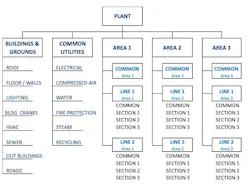
Consider an example asset hierarchy structure. See Figure 1. Buildings and grounds contain non-production assets managed by location. Common utilities contain non-production assets managed by system. Utilities include the distribution system throughout the plant up to where the utility is used by building, area or line. Notice that each area and line has a place for common equipment. This is for hydraulics, motors, blowers, pumps or other equipment that is common at those levels.
The production assets are listed by area, line and section. Consider whether section can be the lowest level asset in the hierarchy, or at most one level lower in large plants. The goal should be ease of selecting assets when creating work orders, and not make running reports easier. If a work order covers more than one section, then it can be written at the line level. Later on, when running a report on a section, if you select work orders for that section and line, you will get the relevant work orders for analysis. You can use ‘key words’ and ‘store iDs to further narrow the work orders for your report. If you have too many assets, you will have to select any number of assets on your report to be sure to get all the relevant work orders.
Mistake: Too many data input choices
Someone on your deployment team will want too many choices for assets and work order codes in the name of having very detailed information. Just remember that there are far more people putting data into the system than getting information out of the system. People want to input data quickly, and if there are too many choices, they will not take the time to make the best choice and often will just pick the first code on the list. The goal of eAM/CMMS systems is not perfect information but rather information that is enough for good decision making.
For each work order code, there should be a maximum of 8 to 12 choices. If you need more detailed information, use a second level choice once the first choice is made.
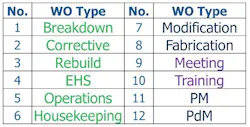
There are 12 choices for work order types (see Figure 2), but the first six are the ones most likely to be used by craft people and they are in order of frequency of use, making accurate selection as easy as possible. Choices 7 to 12 will most likely be used by the planner, who usually creates these work orders. Notice the choices of operations, housekeeping, meeting and training. This plant wanted to capture all the non-maintenance activities that might be performed by craft people. You may or may not want to capture that level of detail.
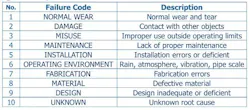
Now, consider some example failure codes (see Figure 3). These are 10 failure code categories recognized by industry, and they are in general order of frequency. Unknown is last to discourage people from picking it without analysis. If you want more detailed information, then add a second level choice once one of these is selected. This is far better than having 20 to 50 choices that few people will take the time to scroll through for best selection. But this list 10 alone will provide meaningful information over time as reinforcement of accurate input turns into a habit.
Build the asset hierarchy and data choices around the user
An eAM/CMMS system should make maintenance work more efficient, not add unnecessary steps to it. An asset hierarchy should help users quickly identify where work needs to be performed, while a manageable number of data-entry choices gives workers a realistic chance of entering useful information consistently.
These configuration decisions also illustrate the larger lesson across all six common deployment mistakes (see part one and part two). A successful eAM/CMMS deployment requires more than putting software in place. Plants need a clear reason for the system, useful information coming back out, common standards across the organization, sustained change management and a system designed around the people who use it.
The point of maximum stress for a successful deployment should come early, when important decisions are made and resources are assigned to support them. The payoff is a much calmer launch because the system supports the work, rather than becoming another problem the plant has to manage.
About the Author
Lawrence P. Chew
Lawrence P. Chew, CMRP, CRL, retired with 46 years manufacturing experience in the aluminum, steel and battery industries, and he served on the corporate reliability teams for three companies. He worked at five large and three small plants with assignments for reliability and maintenance, engineering, operations, business processes, IT, and environment health and safety. Companies he worked for include Arconic (Alcoa), Constellium (Alcan), U. S. Steel and U. S. Steel. He helped lead plant turnarounds in both China and Russia for four years each, where he drove change in foreign cultures and languages. He has worked in many areas, as business and maintenance processes manager, reliability and maintenance manager, and corporate reliability consultant. He has a BSEE from The University of Texas at Austin. He can be reached at [email protected].