Avoid the common mistakes for eAM/CMMS deployments and deliver benefits faster
Key Highlights
- Define clear, measurable operational benefits aligned with the plant's operating plan before system deployment to secure management support and workforce buy-in.
- Prioritize the development of essential reports and views that provide quick, actionable insights to users.
- Focus on post-launch activities such as system optimization, data accuracy, and procedural standardization.
- Ensure data inputs are comprehensive and standardized to minimize the number of reports needed.

Too many enterprise asset management (eAM) or computerized maintenance management system (CMMS) deployments do not achieve results as quickly as expected. A deployment can reach the launch stage on schedule and still fail to deliver much of what the plant expected from the project.
The software is installed, users have been trained and data has been loaded, yet maintenance leaders and workers still struggle to get the information they need. Often, workers see little reason to change how they do their jobs. All the information needed for decision-making and reinforcing new processes is not easily available, thereby reducing the effectiveness of the system. Then, management reduces project resources soon after the launch, before any planned post-launch functionality is deployed. These problems are hard to overcome once the system is operational, so the functionality and cultural transformation takes much longer to achieve or is not achieved at all.
This three-part series examines six common mistakes that can keep eAM/CMMS deployments from delivering their intended benefits. The first two mistakes covered in this article are part of the foundational planning. If the project is not designed around measurable plant benefits and the information needed to achieve them, a technically successful launch can become an expensive exercise in data entry.
Mistake: Operational benefits are not clearly defined and tied to the plant operating plan
It may sound astonishing that a project would not have clear benefits tied to the operating plan, but this can happen with eAM/CMMS deployments. For example, if the project is a corporate initiative, the main benefit may be aggregating information to the company or reducing corporate overhead with no direct benefit to the plant. If it is an IT project, the cost reduction may be to standardize systems and reduce the number of IT systems the company supports, so there will be a focus on deployment, not on user or plant benefits.
When plant management sees a project without clear benefits to the operating plan, they will support the project for the minimum time possible. For software projects, they will want to reduce resources as soon as possible after the launch. If it is a corporate mandate, they will support it only as long as mandated. Project managers may have big plans post-launch, but without clear benefits to the operating plan, both local and corporate resources won’t last long.
In addition, plant management may not adequately sponsor the project and communicate support to the workforce. Without clear benefits, it will be harder to explain to the workforce, who will use and input data into the system, the ‘why’ and ‘what’s in it for me.’ These factors may increase workforce resistance to the new system.
To be fair, it can be challenging to define benefits to be achieved within 12 months of a new launch, but this is necessary to justify the time and resources needed. The benefits must be identified early in the project. Here are some examples of benefits that support the operating plan:
- improve OEE (availability, productivity, and quality) by reducing breakdowns and repair time
- reduce repeat breakdowns using root cause analysis and corrective action
- sustain function and prevent breakdowns through PM and PdM programs
- improve availability of spare parts and rebuilds through stores optimization
- reduce spend on spare parts, capital spares, and contractors due to fewer breakdowns, especially major breakdowns
- reduce MRO inventory by adjusting on-hand quantity, eliminating duplicates and reducing excess quantity
- improve labor utilization by improving PM/PdM compliance, schedule compliance, or work order hours as a percent of total labor hours
- justify craft headcount due to planned work order backlog.
Once the project has clear benefits approved by management, the work needed for the launch can be scoped, and don’t agree to the launch until all of these points are identified and in place:
- all data input and output needed at launch to achieve benefits and change workforce habits
- reports and customizations needed at launch that simplify people’s jobs and decision-making, by getting information in or out for people faster than before
- key people inputting data and using data
- training that enables and motivates benefits
- a clear sponsorship message from plant management early in the project and prior to the launch.
Delivering benefits within about 12 months also gives you time to focus post-launch resources on system optimization to improve data and procedures in the eAM/CMMS, which will greatly enhance the efficiency of the workforce over time, such as:
- PM optimization
- rebuild and changeouts procedures
- accurate asset BOM’s, then adjusting MRO min/max levels based on quantity of installed parts and planned usage.
- standardized asset and part names and IDs to ease sharing of parts and capital spares across plants.
Focus on shortest time to benefit rather than shortest time to deployment.
Mistake: Inadequate focus on getting data OUT to those who need it
Project managers naturally focus on data setup and data input, since these are essential for launching. That means that reports and views people need to do their jobs are often not fully thought out. Reports may be thought of as a post-launch activity, but without critical reports, benefits will be delayed and change management will be inadequate.
Reports should take no more than 10 minutes to generate or busy employees will not take the time to run them. Consider for the following categories to help identify the reports and views needed before launching new software:
Think about what supervisors need to monitor in order to give feedback to their shift, and what managers need at daily meetings, such as:
- What work orders were created, worked on, or completed for each shift or day?
- Who worked on each job and was all the input information entered correctly?
- What do we know about the failures?
- Which work orders require follow-up action (e.g. waiting on parts, modify procedure, root cause analysis)?
- Did we have the correct replacement parts in stock?
Weekly KPIs
- craft labor hours by work order type
- PM compliance
- weekly schedules and completion vs. breakdowns and unplanned work
- work order backlog with status and aging
- spare parts spend, stockouts, and min/max adjustments
- shop rebuild completions and ready inventory
Monthly and trailing 12-months reports
- maintenance spend (craft labor, parts and contractors) by plant, department and line
- Monthly KPIs, from key weekly numbers
Reliability questions to answer
- How many instances of this failure have we had on this line or similar lines at other plants?
- Who has worked on this failure and similar failures? What procedures were followed?
- Are parts lasting as long as expected? Is there a difference between suppliers?
- Which plants have critical spares and capital spares?
A summary work order report for comparing large numbers of work orders and a detailed work order report for analysis across a group of work orders is useful. For KPIs and financial reports, reports should cover different time periods (weekly, monthly, date range) and other reports for a series of periods (trailing 12 months, monthly, weekly, yearly).
The key to making reports useful to the largest number of people is to have as many data inputs as possible to generate each report. This will help minimize the total number of reports, instead of writing different reports to answer specific questions or for each type of user. Fewer standard reports will take less effort to maintain, and it will be easier for users to find the reports they need.
Consider the following to maximize inputs to running reports:
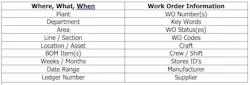
Finally, consider the needs of all users when defining reports, from shop floor to plant management and corporate leadership. Don’t forget all the functional roles, such as accounting, quality, engineering, procurement, IT and HR.
Start with operational benefits, not software deployment
Clear operating-plan benefits give management a reason to sustain the resources required after a software launch, while useful reports and dashboard views give supervisors, planners and managers the information needed to reinforce new processes.
This solid foundation also makes the next set of deployment decisions easier. Once the plant knows what it wants the system to accomplish and what information users need, the organization must determine how standards, workflows and responsibilities will be managed across plants — and how people will be supported as they adopt new ways of working. Those organizational issues are the focus of the next article in this series.
About the Author
Lawrence P. Chew
Lawrence P. Chew, CMRP, CRL, retired with 46 years manufacturing experience in the aluminum, steel and battery industries, and he served on the corporate reliability teams for three companies. He worked at five large and three small plants with assignments for reliability and maintenance, engineering, operations, business processes, IT, and environment health and safety. Companies he worked for include Arconic (Alcoa), Constellium (Alcan), U. S. Steel and U. S. Steel. He helped lead plant turnarounds in both China and Russia for four years each, where he drove change in foreign cultures and languages. He has worked in many areas, as business and maintenance processes manager, reliability and maintenance manager, and corporate reliability consultant. He has a BSEE from The University of Texas at Austin. He can be reached at [email protected].